Subscription notifications
Subscription notifications are a Microsoft Graph feature that sends CDM real-time alerts when specific data changes in Microsoft 365. When CDM receives a notification, it retrieves the latest files and folders from Microsoft 365.
Overview
Subscription notifications enable CDM to detect changes in Microsoft 365 and retrieve the latest files and folders using an event-driven process.
CDM subscribes to notifications from Microsoft Graph for individual Microsoft 365 storage locations, known as resources. A resource represents a specific Microsoft 365 location, such as a OneDrive drive, a SharePoint document library, or the Files tab of a Microsoft Teams channel. A CDM-mapped drive can contain one or more resources, depending on the drive type.
When a file or folder within a resource is created, updated, moved, or deleted in Microsoft 365, Microsoft Graph sends a real-time notification to CDM indicating that the resource has changed. After receiving the notification, CDM retrieves the latest files and folders for that resource.
By retrieving files and folders only when necessary, CDM avoids continuously checking Microsoft Graph for changes. This reduces unnecessary API calls and lowers the risk of throttling across a Microsoft 365 tenant.
How subscription notifications work
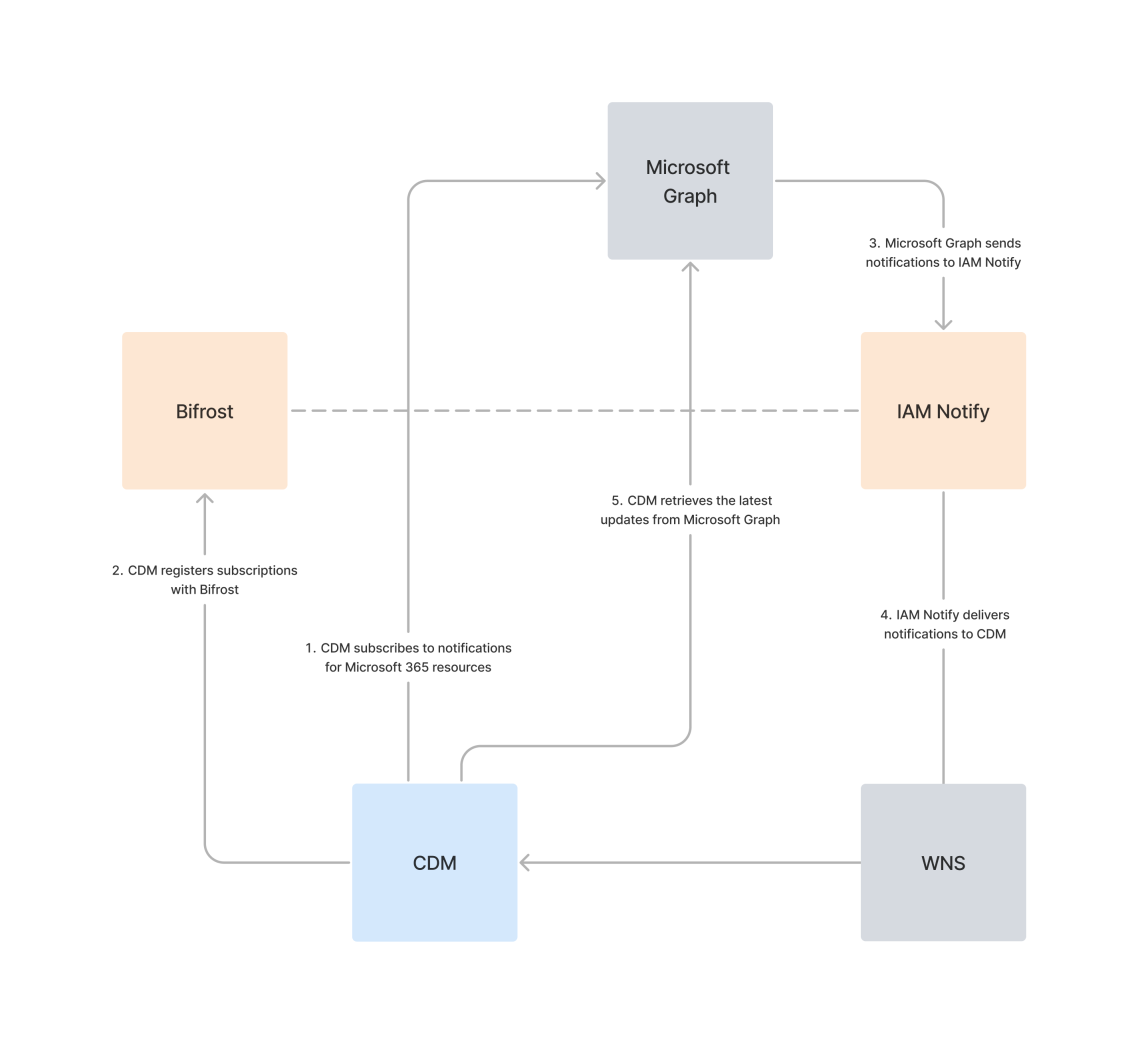
CDM uses subscription notifications in the following event-driven process to detect and retrieve changes from Microsoft 365 storage locations: 
-
CDM registers subscriptions with Bifrost (the IAM Cloud API)
-
Microsoft Graph sends notifications to IAM Notify (the IAM Cloud notification system)
CDM subscribes to notifications for Microsoft 365 resources
CDM monitors changes at the level of Microsoft 365 resources. To detect changes, CDM subscribes to Microsoft Graph notifications for each resource it needs to monitor. These notifications alert CDM when files or folders within the resource change.
The following drive types contain a single Microsoft 365 resource and subscribe to notifications as soon as the drive is mapped during startup:
-
Direct: OneDrive
-
Direct: SharePoint document library
The following drive types contain multiple Microsoft 365 resources and subscribe to notifications only when a user navigates to a specific resource within the drive:
-
Direct: SharePoint site
-
Dynamic: SharePoint
-
Dynamic: Microsoft Teams
-
Dynamic: OneDrive shortcuts
Direct: Shared OneDrive drives do not support subscription notifications. For this drive type, CDM checks for changes by requesting updates from Microsoft Graph at the interval defined for the Delta Polling Period under Advanced settings on the Providers page in Iris.
CDM registers subscriptions with Bifrost
When CDM needs to subscribe to Microsoft Graph notifications for a specific Microsoft 365 resource, it registers the subscription with Bifrost. Bifrost acts as a central coordination point between CDM clients and Microsoft Graph, tracking subscription creation and expiry across the organization.
Microsoft Graph sends notifications to IAM Notify
When Microsoft Graph detects a change to a resource for which CDM has subscribed to notifications, it informs IAM Notify. IAM Notify operates within the IAM Cloud infrastructure and receives all notifications from Microsoft Graph. It identifies which resource has changed and prepares the notification for delivery to the appropriate CDM clients based on the subscription information registered in Bifrost.
IAM Notify only processes the data required to identify a change:
-
Resource ID: Identifies where the change occurred in Microsoft 365.
-
Subscription ID: Links the notification to the correct CDM clients.
IAM Notify delivers notifications to CDM
IAM Notify forwards notifications to CDM clients via the Windows Push Notification Services (WNS). WNS is Microsoft’s push-notification framework for Windows, used to deliver lightweight, real-time messages directly to applications. The WNS message contains only the Resource ID and Subscription ID, enabling CDM to determine which Microsoft 365 resource has changed.
CDM retrieves the latest updates from Microsoft Graph
When CDM receives a WNS notification, it retrieves the latest file and folder changes for the resource from Microsoft Graph and updates any mapped drives that include it.
Throughout the entire process, data is handled securely. IAM Notify processes notifications in a controlled environment and retains them only long enough to forward them to WNS. No file contents or personal data are stored or transmitted at any point.